Minecraft is one of those games where you can chill for hours mining, building, or wandering around with no real plan… and that’s part of the magic.
But sometimes, especially when you’re testing things or managing a world, it’s nice to skip the grind and use commands (a.k.a. cheats).
Commands let you:
- grab any item instantly
- switch gamemodes
- control weather and time
- teleport anywhere
- spawn mobs
- fix mistakes
- or just mess around for fun
After years of running servers, building adventure maps, and testing mods, I can tell you: knowing commands makes Minecraft 10x easier.
Here’s the clean, no-nonsense guide.
How to Enable Commands
Commands aren’t always on by default. Here’s how to enable them whether you’re starting fresh or using an existing world.
➡️ For a NEW world
When creating a world:
- Click More World Options
- Set Allow Cheats: ON
- Create your world normally
Done.
➡️ For an EXISTING world
If the world is already created:
- Pause the game (Esc)
- Click Open to LAN
- Set Allow Cheats: ON
- Click Start LAN World
Commands will work as long as that session is open.
⚠️ Important:
Once cheats are enabled, achievements are turned off for that world or server session.
How to Enter Commands
Press T (or /) to open the chat bar.
Every command starts with a slash /.
/help→ shows all commands/help <command>→ explains a specific command
To close the console, press Esc.
Useful Commands Every Player Should Know
Now for the fun part — the actual commands you’ll use all the time.
1. Change Your Gamemode
Minecraft has four modes:
- Creative — unlimited blocks, invincible, building freedom
- Survival — the classic experience
- Adventure — used for maps with custom rules
- Spectator — fly through blocks, camera mode
Commands:
/gamemode creative
/gamemode survival
/gamemode adventure
/gamemode spectator
You can also target players:
/gamemode creative gamer123
2. Control the Weather
Weather getting annoying? Easy fix.
General format:
/weather <type> [duration]
Types:
clearrainthunder
Examples:
/weather clear
/weather rain 1000
Snowy biomes will snow instead of rain.
3. Change the Time of Day
Time control is simple:
/time set day
/time set noon
/time set night
/time set midnight
You can also use ticks:
/time set 18000
4. Give Yourself Items
One of the best commands in the game.
Format:
/give <player> <item> <amount>
Example:
/give gamer gold_block 4
Instead of a name, use selectors:
@p→ nearest player@a→ all players@r→ random player
Example:
/give @p diamond_sword 1
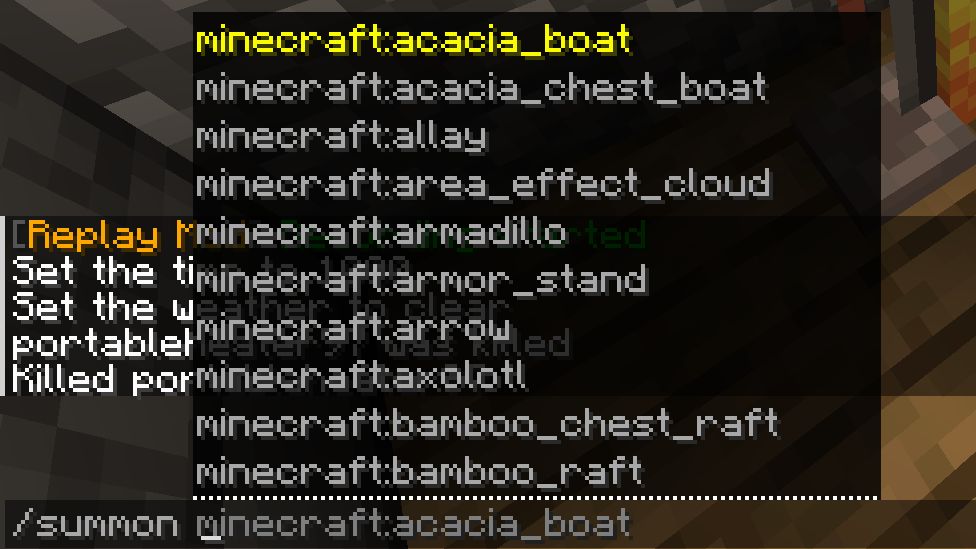
5. Spawn Mobs Instantly
Want mobs without searching for them? Use:
/summon <mob>
Examples:
/summon cat
/summon donkey
/summon iron_golem
/summon ender_dragon
Yes, you can summon the Ender Dragon… just be ready for chaos.
6. Remove Mobs (or Players)
The /kill command can clear mobs fast — but be careful with it.
Kill a specific player:
/kill gamer
Kill all players (don’t do this lightly):
/kill @e[type=player]
Kill all mobs of a type:
/kill @e[type=slime]
/kill @e[type=zombie]
Kill everything except players:
/kill @e[type=!player]
Kill mobs in a radius:
/kill @e[type=cow,r=20]
Useful for server cleanups.
7. Locate Biomes, Structures & Points of Interest
One of the most powerful commands for exploration.
Locate a biome:
/locate biome cherry_grove
Locate a structure:
/locate structure village_desert
The game will give you coordinates.
8. Teleport Anywhere
Once you know coordinates, teleporting is easy.
Basic teleport:
/teleport gamer 282 63 -626
Teleport to another player:
/teleport nickname1 nickname2
Throw yourself into the air:
/teleport nickname ~ ~10 ~
Move a group of mobs:
/teleport @e[type=cow,limit=5] -30 65 8
9. Give Yourself XP (Fast Enchanting)
Experience normally comes from mining, mobs, farming, trading…
But commands let you speed things up.
/xp add gamer 100
This instantly sets the player to level 100.
Works with:
@p@a@r
Final Thoughts from a Long-Time Player
Whether you’re testing a base design, building a big project, running a server, or just messing around, commands are some of the most powerful tools in Minecraft.
Once you get used to them, you’ll wonder how you ever played without:
- teleporting
- instant item access
- mob control
- world editing basics
- and fast XP
Don’t be afraid to experiment — every great builder and server admin started by typing / for the first time.